Here are some notes on using the Sparkfun Thumb Slide Joystick on an Ardunio. This is a small two way X-Y variable resistor based controller that uses two analogue pins on the Arduino and works with both the 5 volt logic of the Uno as well as the 3.3 volts of the Teensy.
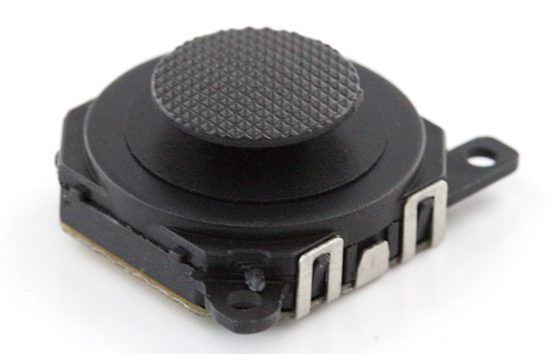
I found that this joystick works well for giving the eight positions found at the stick limits crosswise and diagonally but it doesn’t seem sensitive enough for reporting accurate positions.
Connecting
On the underside of the joystick there are four solder pads, looking from above with the screw holes pointing towards you, the connections are:
- X-Axis
- +5 volts
- Y-Axis
- GND

Should you take one to bits, you will find two sliders with small metal contacts and a circuit board with carbon tracks acting as a variable resistor. The sliders move in a parallel configuration, and the joystick control has a spring to return it to centre when released.

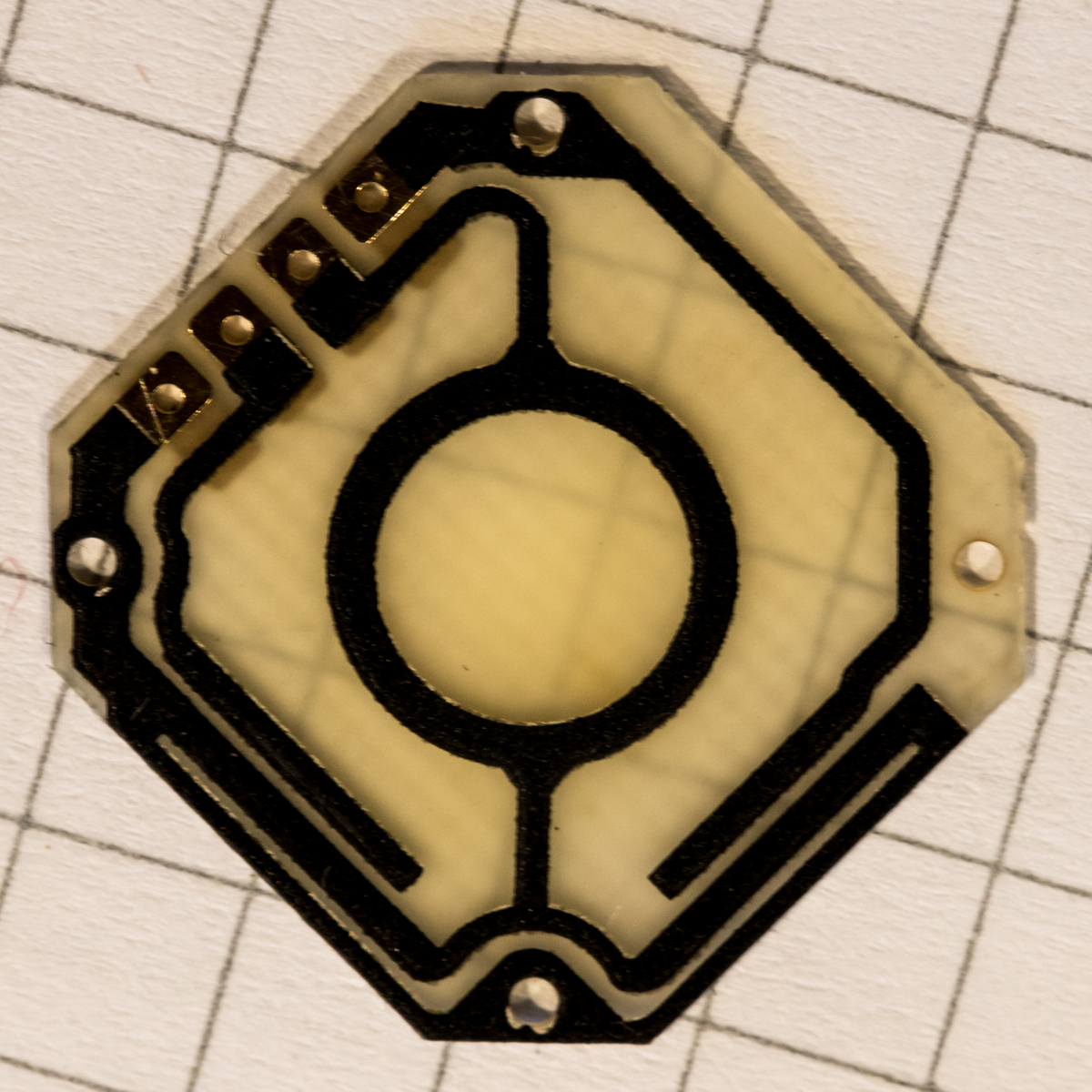
These can be tricky to put back together afterwards.

The pads on the base are spaced at 2mm but with some bending it is possible to attach standard 2.54mm (0.1inch) header pins, solder the inside two first before attaching the outers.

When mounting in a case or panel you will need to drill a 18mm hole for the controller and the thumb pad is raised about 3mm above the surface of the body. I would secure the controller in place with a couple of blobs of hot glue rather than use the small screw holes.
Programming
For my setup I am using the Teensy’s 3.3 volt output to power the joystick and the X-Axis connected to Analog pin 0, and Y-Axis to Analog pin 1,
This test program shows the position of the joystick through the serial port, it attempts to calibrate itself and set the values for the chosen direction, if this is not always successful when returning to the centre position try experimenting with the tolerance and maxRange values.
|
1 2 3 4 5 6 7 8 9 10 11 12 13 14 15 16 17 18 19 20 21 22 23 24 25 26 27 28 29 30 31 32 33 34 35 36 37 38 39 40 41 42 43 44 45 46 47 48 49 50 51 52 53 54 55 56 57 58 59 60 61 62 63 64 65 66 67 68 69 70 71 72 73 74 75 76 77 78 79 80 81 82 83 84 85 86 87 88 89 90 91 92 93 94 95 96 97 98 99 100 101 102 103 104 105 106 107 108 109 110 111 112 113 114 115 116 117 118 |
#define XAXIS A0 #define YAXIS A1 #define MONITOR_LED 13 int xVal=0; int yVal=0; int lastX = 0; int lastY = 0; const int tolerance = 4; int centreXY[2] = {0,0}; // x,y // highest reading on an analog pin is 1023, but the resistors in the thumb slider // limit this to around 900 const int maxVal = 900; // set this too low and detecting diagonals is difficult, too high and detecting // the centre position becomes difficult const int maxRange = 50; // output the joystick position, left, right, etc to the serial port void axisPosition(int x, int y) { char xpos[7] = ""; char ypos[7] = ""; // calculate how far the joystick has to be moved // before the direction is established int left = centreXY[0] - (tolerance-1); // x int right = centreXY[0] + (tolerance+1); // x int top = centreXY[1] - (tolerance-1); // y int bottom = centreXY[1] + (tolerance+1); // y if (abs(x-centreXY[0]) < tolerance) { strcat(xpos,"centre"); } else if (x <= left) { strcat(xpos,"left"); } else if (x >= right) { strcat(xpos,"right"); } else { strcat(xpos,"unknown"); } if (abs(y-centreXY[1]) < tolerance) { strcat(ypos,"centre"); } else if (y <= top) { strcat(ypos,"top"); } else if (y >= bottom) { strcat(ypos,"bottom"); } else { strcat(ypos,"unknown"); } Serial.print("x: "); Serial.print(xpos); Serial.print("\ty: "); Serial.print(ypos); } // see if the joystick has moved outside the set tolerance boolean axisChange(int x, int y) { // abs always returns a positive number, even when the result is negative if (abs(x-lastX) > tolerance) { return true; } if (abs(y-lastY) > tolerance) { return true; } return false; } void setup() { delay(1000); Serial.begin(9600); Serial.println("ready"); pinMode(MONITOR_LED, OUTPUT); digitalWrite(MONITOR_LED, LOW); // get the centre values of the slider. // the centre position may drift in use centreXY[0] = map(analogRead(XAXIS), 0,maxVal, 0,maxRange); centreXY[1] = map(analogRead(YAXIS), 0,maxVal, 0,maxRange); } void loop() { xVal = map(analogRead(XAXIS), 0,maxVal, 0,maxRange); yVal = map(analogRead(YAXIS), 0,maxVal, 0,maxRange); if (axisChange(xVal, yVal) == true) { digitalWrite(MONITOR_LED, HIGH); Serial.print("X: "); Serial.print(xVal); Serial.print("\tY: "); Serial.print(yVal); Serial.print("\t"); axisPosition(xVal, yVal); Serial.println(" "); lastX=xVal; lastY=yVal; delay(30); digitalWrite(MONITOR_LED, LOW); } delay(100); } |
Links
- Hobbytronics – UK Supplier
- Sparkfun Thumb Slide Joystick part number: COM-09426